If you are asking, “why is my solar inverter blinking red,” do not assume the system has failed. A red light may indicate a fault, warning, communication problem, or temporary grid interruption. Its meaning depends on the inverter brand, model, display code, and blinking pattern. A single red flash may differ from a continuous red light.
Solar educator and author Sean White offers a practical reminder: “Read the inverter’s fault message before touching anything.” That advice matters. The small screen may show codes such as isolation fault, grid fault, or low insulation resistance. Some models also blink red during startup or after a brief power cut. The light alone is not enough evidence.
This guide explains what the red indicator can mean and what you can safely check. You may notice a tripped breaker, a dark monitoring app, or a warning appearing after heavy rain. Those details help narrow the cause. Do not open the inverter cover or handle wiring. Solar equipment can remain electrically live, even when the home power is switched off.
Check the manufacturer’s manual first. Record the exact code and time. Then contact a qualified solar technician if the warning continues, returns repeatedly, or appears with heat, burning smells, unusual noise, or damaged cables. A reset might clear a temporary fault, but it can also hide a developing problem. I have seen homeowners focus on the blinking light and overlook the message beside it. That is an easy mistake. The light is a clue, not a diagnosis.
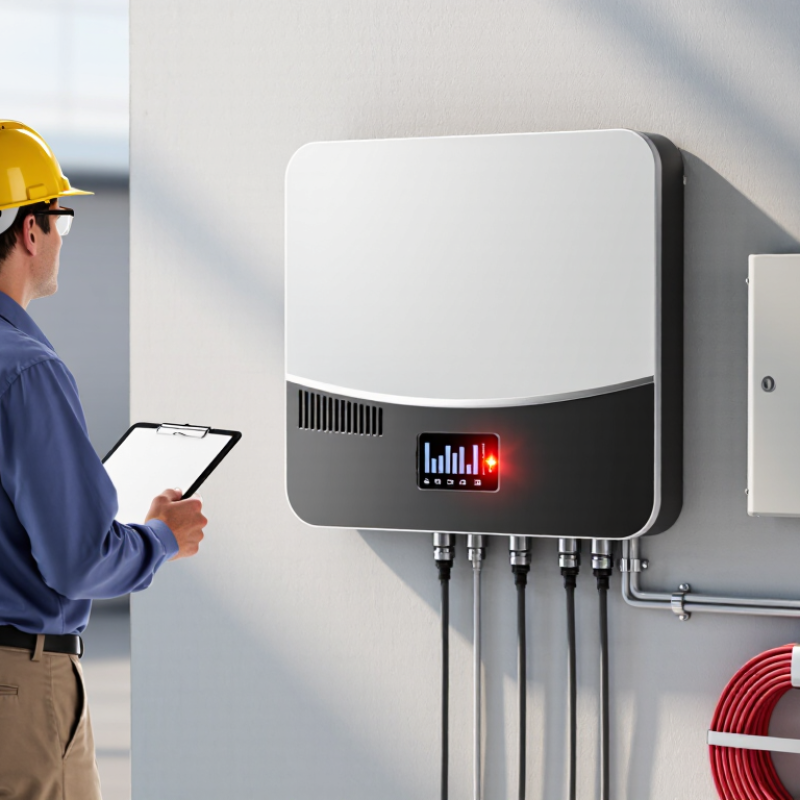
A blinking red light on a solar inverter usually indicates an active warning, fault, or shutdown condition. It does not automatically mean the inverter has failed. Light patterns differ by model, so the display code, monitoring app, and installation manual matter more than the color alone.
NREL’s photovoltaic operations and maintenance guidance identifies inverter faults, grid problems, and communication failures as recurring service issues. IEA PVPS reported more than 400 GW of solar capacity added globally in 2023, while IRENA recorded 1,419 GW of installed solar power by year-end. That scale makes accurate fault diagnosis increasingly important. Check whether the red light blinks slowly or rapidly, then record the exact code and time. A grid outage, low sunlight, loose communication cable, or high internal temperature may trigger the warning. The easy assumption is “broken inverter.” That assumption is often wrong.
Do not open the enclosure or touch exposed wiring. Look for burning smells, unusual heat, water entry, or repeated shutdowns. If these signs appear, keep clear and contact a qualified solar technician. A professional can test DC voltage, AC frequency, grounding, insulation resistance, and protective devices under IEC 62446-1 verification practices. Resetting the system may clear a temporary error, but it can also hide a developing problem. Accurate records help technicians avoid guesswork.
A blinking red light usually indicates a warning or fault condition. The exact meaning varies by inverter model, so check the displayed error code and product manual before taking action.
How to read this chart: The check-priority score reflects a practical troubleshooting order, from routine checks to conditions that may require immediate professional attention. Common causes include grid interruptions, overheating, communication errors, and insulation or ground faults.
Why Is My Solar Inverter Blinking Red? What Does It Mean?
A blinking red light usually signals a warning, not an immediate failure. Its exact meaning depends on the inverter’s control logic and installation settings. Common triggers include grid voltage changes, overheating, insulation faults, communication loss, or reduced insulation resistance after rain. The light is a messenger, not a diagnosis.
The IRENA Renewable Capacity Statistics 2024 report recorded about 345 gigawatts of new solar capacity in 2023. The global solar fleet reached roughly 1,419 gigawatts. More systems mean more warning events, especially during weather changes and grid disturbances. A red indicator may blink slowly during a temporary check, then clear itself. A fast pattern can indicate a persistent fault. Count the flashes carefully. Small detail, big difference.
Check the display screen, event code, and installation manual before touching any cables. Look for heat around ventilation openings, water marks, or a tripped external breaker. Do not open the enclosure. Electrical measurements require qualified personnel and proper isolation procedures. The IEC 62109 safety standard addresses power-converter protection, but it does not create one universal red-light language. That limitation is easy to overlook. A technician should compare the code with measured grid voltage, insulation readings, and temperature history. If production remains at zero, the warning returns repeatedly, or you smell burning insulation, shut down according to the manual and arrange professional inspection.
| Indicator Pattern | Typical System Status | What It Usually Means | Common Causes | Recommended Checks | Urgency |
|---|---|---|---|---|---|
| Solid Green | Normal operation | The inverter is operating normally and is generally producing usable power. | Stable grid connection, sufficient solar irradiance, and no active fault. | Check the monitoring display or app to confirm current power production. | Low |
| Blinking Green | Starting, standby, or communicating | The inverter may be completing its startup checks, waiting for adequate sunlight, or transmitting data. | Low morning or evening sunlight, temporary grid synchronization, or normal communication activity. | Wait several minutes and check whether the light changes after sunlight and grid conditions become stable. | Low |
| Solid Yellow | Warning or reduced operation | The inverter may still be operating, but a condition requires attention or performance may be limited. | High temperature, reduced insulation resistance, communication loss, or an operating value outside the preferred range. | Read the displayed warning code, check ventilation, and inspect the monitoring connection without opening the enclosure. | Medium |
| Blinking Yellow | Temporary warning or waiting state | The inverter is detecting a condition that may clear automatically or is waiting for safe operating conditions. | Grid voltage or frequency fluctuation, low solar input, startup delay, or intermittent communication. | Record the time and warning code, then check whether the condition repeats during different weather or grid conditions. | Medium |
| Solid Red | Active fault or shutdown | The inverter has detected a fault and may have stopped energy conversion to protect people and equipment. | Ground fault, insulation problem, internal fault, severe overheating, or abnormal DC or AC conditions. | Check the fault message, keep clear of damaged equipment, and contact a qualified solar professional if the fault remains active. | High |
| Blinking Red | Fault, warning, or unsuccessful restart | A blinking red light commonly indicates that the inverter has detected an abnormal condition. The exact meaning depends on the inverter’s control logic and fault code. | Grid outage, abnormal grid voltage or frequency, DC input problem, ground-fault detection, overheating, failed startup, or an internal error. | Read the exact code on the display or monitoring platform, check whether the utility supply is available, and follow the equipment manual. Do not remove covers or touch wiring. | High |
| All Lights Off | No power, nighttime shutdown, or communication failure | The inverter may be inactive because there is insufficient sunlight, or it may not be receiving AC or DC power. | Nighttime, tripped disconnect, utility outage, switched-off isolator, blown protective device, or an internal power issue. | Check the time of day, utility supply, and externally accessible disconnect positions only if safe and permitted. | Low to High |
| Red After Heavy Rain | Possible insulation or moisture-related fault | The inverter may be detecting leakage current or reduced insulation resistance in the array or wiring. | Moisture ingress, damaged cable insulation, connector problems, or water entering a junction point. | Do not handle wet equipment. Isolate the area if safe, document the warning code, and arrange a qualified inspection. | High |
| Warning During Hot Weather | Temperature derating or thermal protection | The inverter may reduce output or warn because its operating temperature is too high. | Direct heat exposure, blocked airflow, dust buildup, insufficient clearance, or unusually high ambient temperature. | Keep ventilation openings clear, avoid covering the inverter, and allow it to cool. Persistent warnings require professional service. | Medium |
| Repeating Red Pattern | Recurring fault or failed restart cycle | The inverter repeatedly attempts to start but continues to detect an unsafe or abnormal condition. | Persistent grid abnormality, damaged PV equipment, wiring fault, failed sensor, or internal electronic failure. | Record the flash pattern and error code, avoid repeated manual resets, and contact a qualified installer or electrician. | High |
Why Is My Solar Inverter Blinking Red? What Does It Mean?
A blinking red light usually signals an operating fault, warning, or communication problem. The exact meaning depends on the inverter’s display and instruction manual. A grid outage can trigger this warning, especially during storms or planned maintenance. Check whether nearby lights or appliances have also lost power. Do not assume the solar panels are damaged.
Excessive heat is another common cause. Inverters need clear airflow around their vents. Dust, leaves, or a poorly ventilated enclosure can raise internal temperatures. Some systems blink red when output voltage moves beyond the safe range. Loose wiring, damaged connectors, or moisture may also interrupt normal operation. These faults require careful inspection, not guesswork.
A low battery charge can create a red warning in battery-supported systems. The battery may be empty after several cloudy days, or its protection system may have disconnected it. Look for an error code, unusual noise, burning smells, or melted insulation. Stop using the system if you notice these signs. A qualified solar technician should test voltage, connections, and grounding equipment. One easy mistake is resetting the inverter repeatedly without recording the code. That can hide useful evidence and delay accurate repairs.
Why Is My Solar Inverter Blinking Red What Does It Mean?
A blinking red light usually signals a fault, warning, or communication problem. The exact meaning depends on the inverter’s light pattern and display message. Do not assume it means the system has stopped producing power. Some faults reduce output, while others trigger a complete shutdown.
Safety comes first. Stay on the ground, keep the enclosure closed, and never touch exposed wiring. Solar panels can produce dangerous DC voltage whenever sunlight reaches them. Check the display from a safe position and record the error code, time, and light sequence. A photo can help a qualified technician identify the problem.
Look for simple external causes. Check whether the main circuit breaker has tripped, but do not repeatedly reset it. Inspect visible cables for cuts, burns, loose covers, or water entry. Do not use a wet cloth. If the inverter feels unusually hot, smells burnt, or makes repeated clicking sounds, keep away and contact a licensed electrician.
The manual may describe red blinking as grid failure, insulation resistance trouble, overheating, or a failed connection. These faults require different tests. Resetting the unit might hide the symptom without fixing the cause. That is an easy mistake. A professional can safely isolate the system, test the AC and DC sides, and verify local electrical requirements before restoring operation.
A blinking red light on a solar inverter usually signals a warning, fault, or communication issue. Its meaning varies by model and operating conditions. Treat the indicator as a symptom, not a diagnosis. Check the display for an error code, then read the manual. Do not rely on color alone. The IEA PVPS Trends 2024 report recorded 456 GW of new solar capacity worldwide in 2023. More systems also mean more varied inverter alarms and installation conditions.
A reset is reasonable only when the manual permits it and the site appears safe. Follow the prescribed restart sequence. Before resetting, check for water, a hot enclosure, burnt-plastic smells, damaged cables, or repeated tripping. Never remove covers or touch DC connectors. One reset may clear a temporary grid or communication error. Repeated resets can hide insulation, cooling, or voltage problems. That is where judgment gets harder.
Contact a qualified technician if the red light returns, output remains zero, or the fault persists. Ask for insulation, AC voltage, DC string voltage, grounding, ventilation, and event-log tests. IEC 62109 safety requirements address electrical and thermal hazards during inverter operation. Visual inspection cannot verify those protections. SolarPower Europe’s Operation and Maintenance Best Practice Guidelines recommend documented monitoring and fault response, not guesswork. If smoke, arcing, or severe heat appears, keep away and contact emergency services. I would not reset it.
It may indicate a fault, warning, or communication problem. Check the display message and light pattern. Do not rely on color alone.
Yes. Storms, maintenance, or a tripped breaker can interrupt grid power. Check nearby lights and appliances. The panels may still be undamaged.
Yes. Blocked vents, dust, leaves, or a hot enclosure can restrict airflow. Keep the area clear. Do not open the enclosure.
Stay on the ground and inspect only external parts. Look for cut cables, water entry, loose covers, or burnt insulation. Never touch exposed wiring.
Battery-supported systems may warn when the battery is empty or disconnected. Several cloudy days can reduce its charge. Check the displayed code.
No. Reset only when the manual allows it and the site appears safe. Repeated resets may hide a serious fault. That is an easy mistake.
Stop if you notice smoke, arcing, severe heat, burning smells, or melted insulation. Keep away from the unit. Contact a qualified professional.
Record the error code, time, light sequence, and recent weather. A clear photo may help. Mention unusual clicking or zero output.
Contact one if the red light returns or output stays at zero. They can test voltage, insulation, grounding, connections, and ventilation. Visual checks are not enough.
If you are wondering, “why is my solar inverter blinking red,” the light usually indicates a warning, fault, or abnormal operating condition that requires attention. Inverter lights communicate system status through different colors or blinking patterns, helping you understand whether the unit is operating normally, reporting a temporary issue, or detecting a condition that may stop power conversion. Common causes include grid interruptions, low or unstable voltage, overheating, communication errors, insufficient sunlight, wiring problems, or an internal fault.
Before taking action, check the inverter display or monitoring information for an error code, and inspect the surrounding area for blocked ventilation, moisture, unusual noise, or visible damage. Do not open the inverter or touch electrical connections. If the issue appears temporary and the instructions allow it, you may perform a safe reset using the approved shutdown procedure. If the red light continues blinking, returns frequently, or is accompanied by burning smells, heat, or damaged cables, stop investigating and contact a qualified solar technician for professional testing and repair.

Aryam Energy